Paint by Number April Coloring
- 4.4
- Rating
- 1.00M
- Installs
- Free
- Price

 Analysis by App-foxy
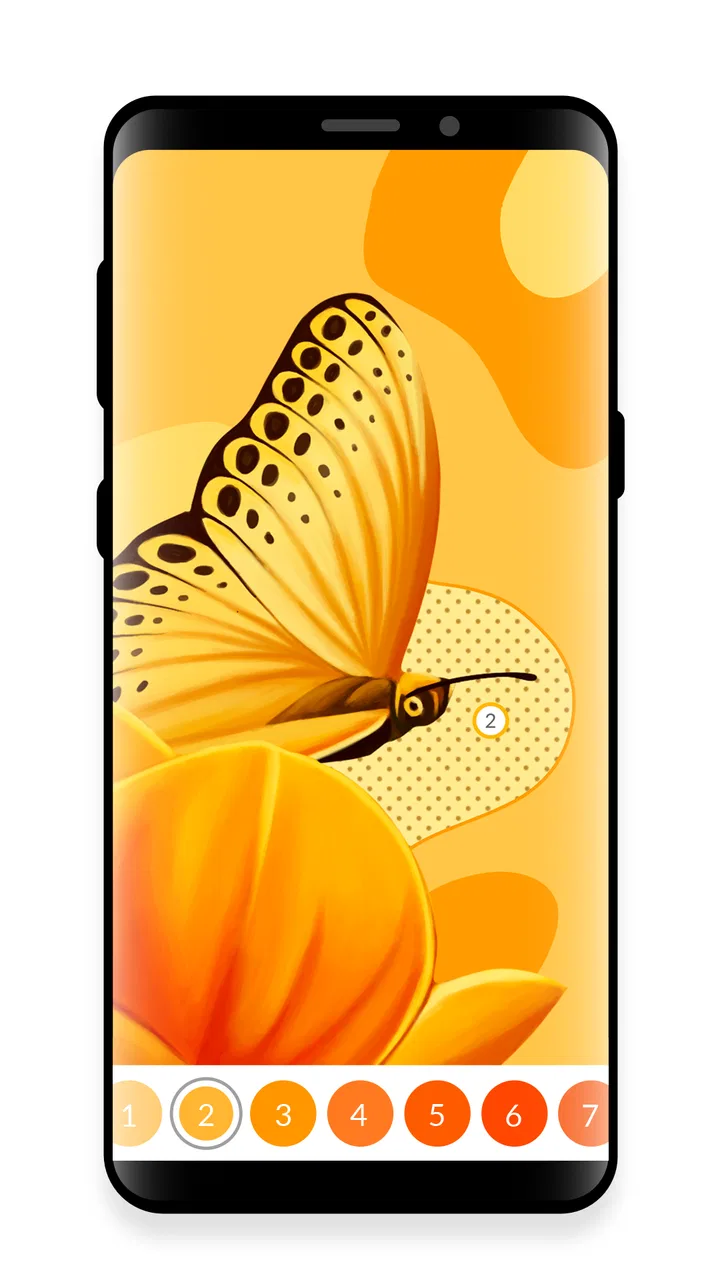
I approached Paint by Number April Coloring expecting a simple way to pass a few quiet minutes, but its appeal is more specific than that. This is a board game built around oil-painting-style pictures and numbered colors, with a control scheme that asks me to swipe across areas instead of tapping each one individually. That small difference changes the rhythm: I spend less time hunting for tiny spaces and more time watching a picture gradually take shape.
My overall view is positive, with one important qualification. This is best understood as a calm, guided coloring activity rather than a competitive board game or a serious digital painting tool. When I want something gentle for a short break, it works well. When I want creative freedom, a challenge, or a game with meaningful decisions, I would choose something else.
Why the swipe-based painting feels different
The central idea is easy to understand. I choose a picture, select the numbered color that matches the highlighted areas, and move my finger across the image. The game fills the appropriate spaces as I work. Because the interaction is based on swipes, the process feels more continuous than traditional paint-by-number apps that make me tap every individual section.
You May Also Like

 Blood Strike: 2.5 Anniversary
Blood Strike’s Loadouts Turn Every Drop Into a Tactical Gamble
A close look at Blood Strike’s custom loadouts: how fast access to signature weapons reshapes its battle royale rhythm, rewards preparation, and narrows the gap between fights.

 Pandora - Music & Podcasts
Pandora’s Music Is Easy to Start, but Harder to Recover
Pandora’s strength is its low-effort path from a seed to a station. Its weak spot is how much confidence it asks you to place in connection, setup, and quiet recovery.

 8 Ball Pool
 Is Built on Rivalries, Rematches, and Routine
A close look at the rivalries, rematches, shared routines, and unanswered safety questions that turn a quick pool match into a persistent mobile community.

 Samsung Music
’s Quiet Strength Is Playing What You Already Own
Its reach comes less from spectacle than from dependable access to a personal library. That simplicity is both the app’s strongest retention engine and its ceiling.

 AccuWeather: Weather Radar
AccuWeather Review: A Quick, Clear Forecast for Everyday Decisions
For everyday plans, the best forecast is the one you can understand quickly. AccuWeather makes rain timing, radar, and local conditions easy to act on, with a few trade-offs.

 Hill Climb Racing
Why Hill Climb Racing Still Turns Crashes Into One More Run
A tiny car, a bumpy hill and one more upgrade: Hill Climb Racing keeps resurfacing because its simple chaos makes every near-miss feel personal.
More From Our News Desk



That matters most on pictures with many small regions. Repeated tapping can become tiring, especially when I am trying to finish a detailed image on a phone. Swiping makes the job feel closer to brushing over a canvas, even though the game still guides every color choice. I am not deciding where shadows should go or mixing my own palette, but I do get a satisfying sense of movement as the artwork develops.
The oil-painting presentation also gives the finished images a warmer appearance than a plain flat-color puzzle. I found myself paying attention to how neighboring shades changed the mood of a scene. A darker region could make an object appear more defined, while a lighter color helped the picture feel complete. The game therefore works not only as a matching exercise, but also as a slow reveal.
It is published by Crimson Pine Games and sits comfortably in the board category, although its experience is closer to a relaxing coloring pastime than to classic board games such as chess, checkers, or digital card games. That distinction is useful when deciding whether it belongs on your device. There is no need to learn a complicated rule set, memorize strategies, or compete against another player. The main reward is finishing an illustration.
The game is free to start and is suitable for Everyone, which makes it approachable for a broad audience. Its current version is 3.54.0, and it runs on operating systems from version 9 onward. In practical terms, that makes it a reasonable option for people using an older compatible phone or tablet, provided the device can handle the artwork comfortably.
A relaxing routine rather than a race
I think the strongest part of the experience is its pace. The numbered structure gives me enough direction to avoid staring at a blank canvas, while the swipe control keeps the activity active enough that I do not feel completely passive. It is a useful middle ground between watching something and making something.
A realistic use case is an evening when I have ten or fifteen minutes before bed but do not want a demanding game. I can open a picture, complete a few color groups, and stop without losing the sense of progress. The same routine works during a commute or while waiting for an appointment, although I would use a larger screen if the illustration contains especially fine sections.
Another good use is as a low-pressure creative break during work or study. I would not call it a productivity tool, but the simple sequence of choosing a number and sweeping over matching areas gives my attention one clear task. That can be refreshing after a long period of reading or screen-heavy concentration. The important point is that the game does not ask me to plan several moves ahead.
For children, the Everyone rating makes the concept accessible, but I would still treat it as a shared choice rather than assuming every child will enjoy it. Some young players want immediate action, characters, or a clear win condition. This game is slower and more repetitive. It may appeal to a child who already likes coloring, while a child looking for fast rewards could lose interest quickly.
Small habits that improve the experience
I get better results when I do not try to finish a picture in one sitting. Working through a single color across several areas gives the image a more coherent progression, and it reduces the feeling of jumping randomly around the canvas. After that, I can switch to another shade and see how the composition becomes clearer.
On a phone, I also prefer to hold the device steadily and use shorter, deliberate swipes around detailed sections. Long movements are comfortable across broad areas, but they are less precise near borders. The swipe system is convenient, not magical: it reduces tapping, yet it still rewards careful finger control when the artwork becomes intricate.
A useful trade-off is deciding whether to chase completion or simply enjoy the process. If I focus only on finishing quickly, the activity can turn into repetitive checking. If I treat each color group as a small drawing session, the same mechanics feel more satisfying. This is one of the reasons I would recommend it to someone who wants relaxation rather than a score-based challenge.
I also think the game is better suited to a stylus or a tablet-sized display when available, especially for users who find phone screens cramped. The basic idea remains accessible on a smaller device, but more room makes sweeping around narrow shapes less frustrating. This is not a requirement, just a practical way to make detailed pictures easier to handle.
Where the game succeeds and where it falls short
The clearest strength is consistency. The controls, numbered structure, and painting theme all support the same goal: helping me complete an attractive picture without demanding artistic skill. I never need to wonder what to do next. That makes it easier to pick up after a long break, and it also makes the game suitable for someone who does not normally play board games.
The swipe interaction is more than a cosmetic change. In the usual tap-by-number alternative, the process can become a sequence of isolated touches. Here, dragging across a region creates a smoother hand movement. I still match colors to numbers, but the action feels less like filling out a form and more like guiding a brush.
The visual style is another reason to keep it installed. Oil-painting-inspired images give the activity a softer character than stark geometric coloring puzzles. I enjoyed seeing how a picture moved from a collection of empty shapes to something with depth. That gradual transformation is the main source of motivation, so people who appreciate visual progress will probably get more from it than people who need story or competition.
The scale of its audience suggests that the concept has broad appeal: it has passed one million installs, with an average rating of 4.4 from around eighteen thousand ratings and roughly two thousand two hundred written reviews. I would not treat popularity as proof that every player will enjoy it, but those figures do support the impression that this is an established choice rather than an obscure experiment.
The meaningful weakness is repetition. The same basic loop remains in place throughout: identify a number, select its color, and swipe over the matching spaces. That simplicity is exactly what makes the game relaxing, but it also limits its long-term variety for me. After several sessions, I wanted more meaningful decisions instead of another illustration using the same method.
This is also not a replacement for a real drawing app. I cannot freely sketch, choose any color I want, or reinterpret the image in my own style. The finished result is guided from the beginning. If you want to practice composition, experiment with brushwork, or create something personal, a dedicated art application is a better fit.
Compared with classic board games, it has almost none of the strategic tension that makes those games replayable. There is no opponent to read, no resource management, and no clever move to discover. Compared with ordinary coloring books, it offers more guidance and a more polished animated process, but less freedom. Compared with other paint-by-number games, its swipe-centered handling and oil-painting presentation are the features that give it the clearest identity.
The free entry point is helpful, but the in-app purchase range runs from $0.99 to $99.99 per item. That is worth considering before settling into the game as a regular habit. I would begin without spending and decide later whether the available free experience gives me enough value. Anyone uncomfortable with optional purchases should pay attention during use and avoid treating the game as an unlimited free art library.
Another limitation is that the calm design may not satisfy users who need strong goals. Completing a picture can feel rewarding, but it is a self-directed reward. There is no reason to hurry, and that is good for relaxation but less appealing if I am looking for pressure, competition, or a clear sense of mastery. I would skip this game when I want a puzzle that tests logic rather than patience.
Who should install it
I would recommend it first to adults who enjoy coloring but want more guidance than a blank digital canvas provides. It is also a good match for people who like visual routines, quiet hobbies, and games that can be paused without consequence. The numbered format removes the anxiety of choosing colors, while the swipe action gives the hands something simple to do.
It may suit families as well, particularly when an adult and child want to work through a calm activity together. The Everyone rating helps make it broadly approachable, but expectations matter. I would present it as digital coloring, not as a conventional board game with turns and winners. That description will lead to a much better first impression.
I would be more cautious about recommending it to creative users who want control over every detail. The game’s strength is that it makes attractive results easy to reach; its limitation is that the player does not really author the image. If your enjoyment comes from making unusual color choices or drawing from scratch, this guided format could feel restrictive.
It is also a poor choice for someone who dislikes repetitive touch gestures. Swiping is more comfortable than constant tapping in many situations, but it is still the main activity. Players with limited patience for detailed completion tasks may find that the novelty wears off before the picture is finished.
For device choice, I would try it on a tablet if I expected to spend long sessions with detailed illustrations. A phone is convenient for quick breaks, and the minimum operating system requirement keeps the technical barrier fairly modest, but screen size affects comfort. The best setup is the one that lets me see narrow sections clearly without repeatedly correcting a swipe.
My final recommendation
Paint by Number April Coloring succeeds because it understands exactly what kind of entertainment it wants to provide. It does not pretend to be a strategic board game or a full art studio. Instead, it offers a guided painting routine with a pleasant visual payoff and a swipe control that makes the familiar paint-by-number format feel smoother.
My recommendation is to try it if you want a quiet, low-pressure coloring game and are comfortable with repetition and optional purchases. I would keep it for short relaxation sessions, especially when I want a creative-looking result without having to make artistic decisions. I would not choose it for competitive play, deep puzzles, or unrestricted drawing.
The free price makes experimenting easy, and the broad age rating means it can work for more than one kind of player. Just approach it with the right expectations: the pleasure comes from the rhythm of filling, the gradual appearance of the oil-painting effect, and the satisfaction of completion. For me, that is enough to make it a worthwhile casual game, even if its simple loop eventually asks whether I am still enjoying the process or merely finishing another picture.
FAQs for Paint by Number April Coloring
01What is Paint by Number April Coloring?
Paint by Number April Coloring is a relaxing digital coloring app built around numbered illustrations. Each picture is divided into small sections, and you fill them by matching colors to their corresponding numbers. The April-themed collection generally includes seasonal, floral, nature, and other cheerful designs. It is designed for casual play, creative relaxation, and short coloring sessions rather than competitive gameplay.
02How does the coloring system work?
After selecting an illustration, the app displays a palette with numbered colors and highlights the areas that still need to be completed. You tap the correct sections to fill them, while hints or assistance tools may help locate difficult areas. Some images contain very small details, so zooming in can make coloring easier. Completing the artwork gradually reveals the finished picture and provides a satisfying sense of progress.
03Is Paint by Number April Coloring free to download and use?
The app can generally be downloaded for free, but the available content and features may depend on the version installed. Free users may encounter advertisements, optional hint systems, or locked illustrations that require an in-app purchase, subscription, or another form of access. Before downloading, check the current store listing for pricing, advertising details, and whether premium artwork is included.
04Does the app require an internet connection?
An internet connection may be needed for the initial download, advertisements, new picture collections, cloud features, or in-app purchases. Some previously downloaded coloring pages may remain available offline, but this can vary by device and app version. If offline use is important to you, test the application after disabling mobile data and Wi-Fi, and avoid assuming that every image will work without connectivity.
05Is Paint by Number April Coloring suitable for children?
The simple tap-to-color controls make the app accessible to many children, and the activity can support concentration, color recognition, and creative expression. However, parents should review the app’s advertising, privacy settings, and purchase options before allowing unsupervised use. Very detailed pictures may be frustrating for younger users, while older children and adults may appreciate the calming, repetitive coloring experience.
Pros
- Simple controls make coloring accessible for beginners and casual users.
- Large library of pictures provides plenty of subjects to explore.
- Helpful hints make it easier to find small
- hard-to-see areas.
- Completed artworks can be saved and shared with friends.
- Relaxing gameplay works well for short breaks or quiet evenings.
Cons
- Some detailed images require considerable time and patience to finish.
- Hints and extra tools may be limited unless you watch ads or pay.
- The app can become repetitive if you prefer more creative freedom.
- Frequent advertisements may interrupt the coloring experience.
- A stable internet connection may be needed for some content and features.

Paint by Number April Coloring
Gallery